



New for 2022 - Louisville Athletics Alumni Ticketing Program!
As part of our commitment to expanded alumni engagement, we are excited to welcome our former student-athletes home to the nest and give them a chance to watch their Cards in action.
It will always be a goal of this athletic department to ensure anyone who played here and helped us build the Legacy of Louisville Cardinal Athletics feels welcomed and invited to anything we do in this department.
The ticketing program is just the beginning of a number of initiatives we will roll out in the near future to ensure all Louisville Cardinal alums get the opportunity to be involved with the legacies they helped create.
Keeping in Touch:
Do we have your most updated contact information? Do you have a teammate who isn’t receiving our messages? Let us know. CLICK HERE TO UPDATE INFORMATION.
ALL LOUISVILLE ATHLETICS' ALUMNI
All Louisville Athletics' alumni will have the opportunity to claim a complimentary ticket to:
- Louisville Football's Homecoming game vs. Pittsburgh on Oct. 22
- Louisville Volleyball's KFC Yum! Center match vs. Notre Dame on Oct. 26
- A men's basketball, women's basketball, and baseball game
TICKETED SPORTS ALUMNI
Every alumnus from a ticketed sport qualifies for the opportunity to request a complimentary single-game ticket to each home game for the sport in which they participated.
- Football Alum: Complimentary tickets for football's September home games are now available. Click the football icon below to claim a ticket.
- Volleyball Alum: Complimentary tickets for volleyball's KFC Yum! Center match are available to claim. Click the volleyball icon below to claim two tickets.
- Men's & Women's Basketball and Baseball Alum: Stay tuned for claim details coming closer to the season!

TICKETS



STEP-BY-STEP INSTRUCTIONS - TICKET CLAIM
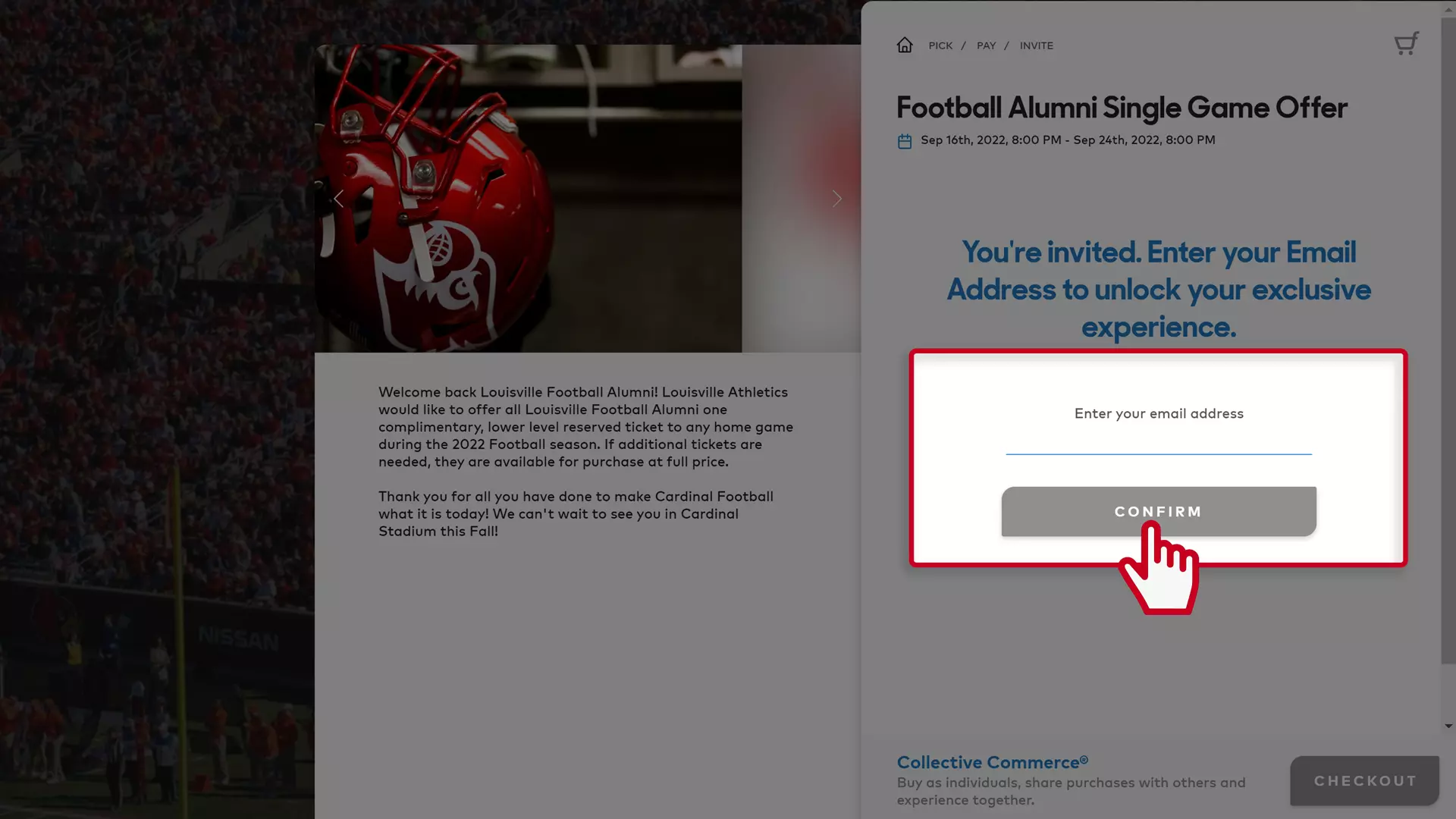
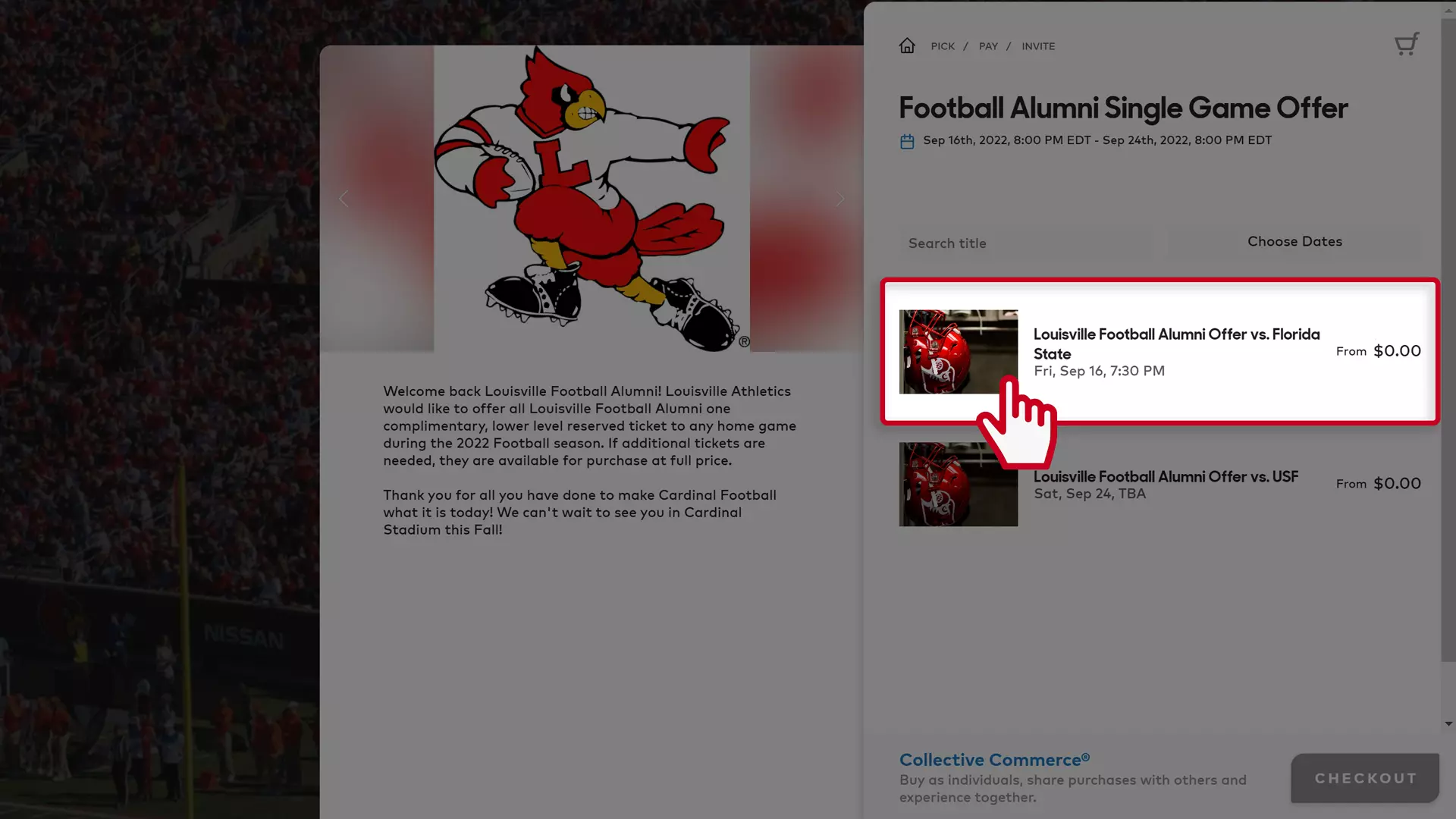
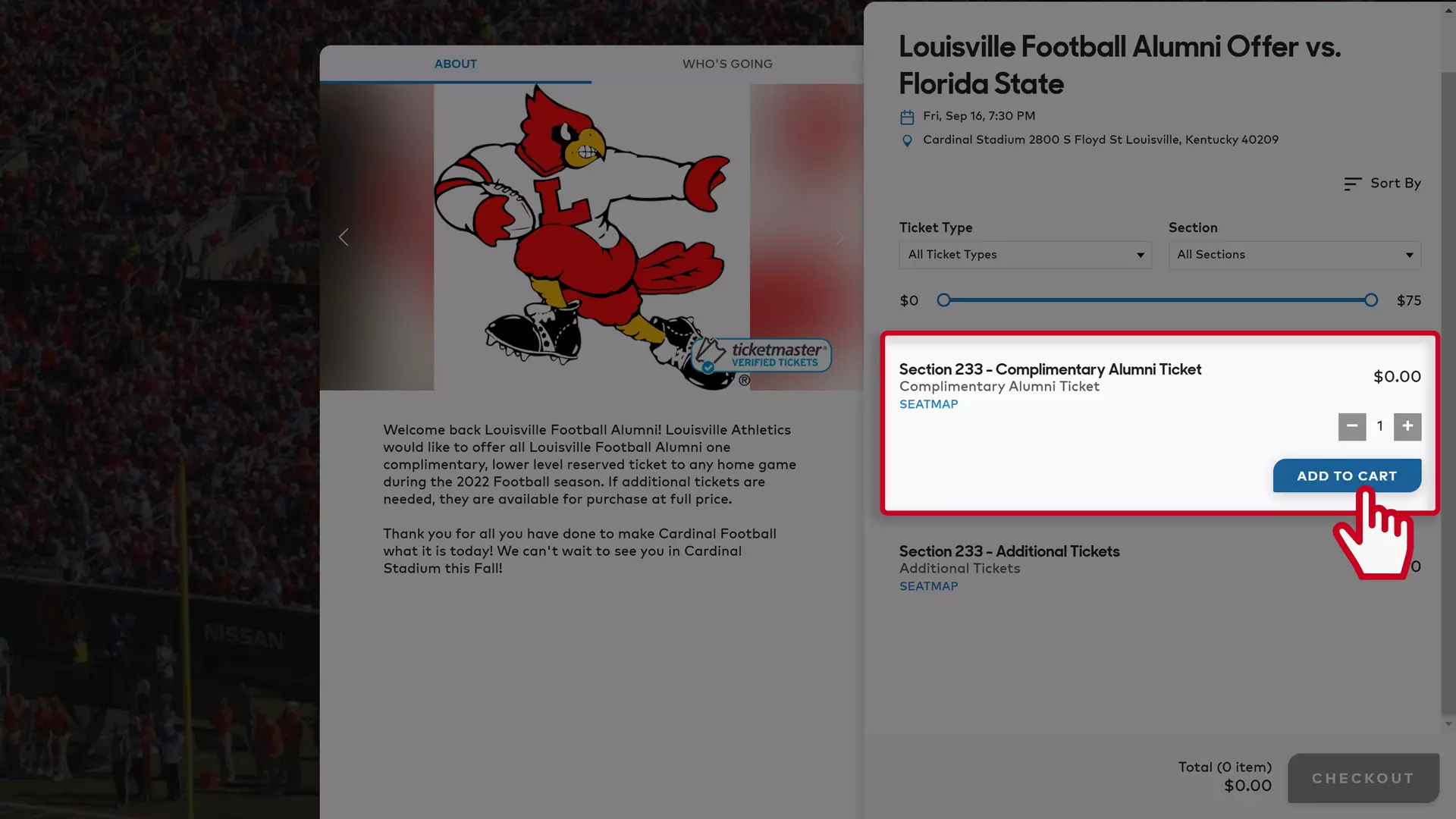
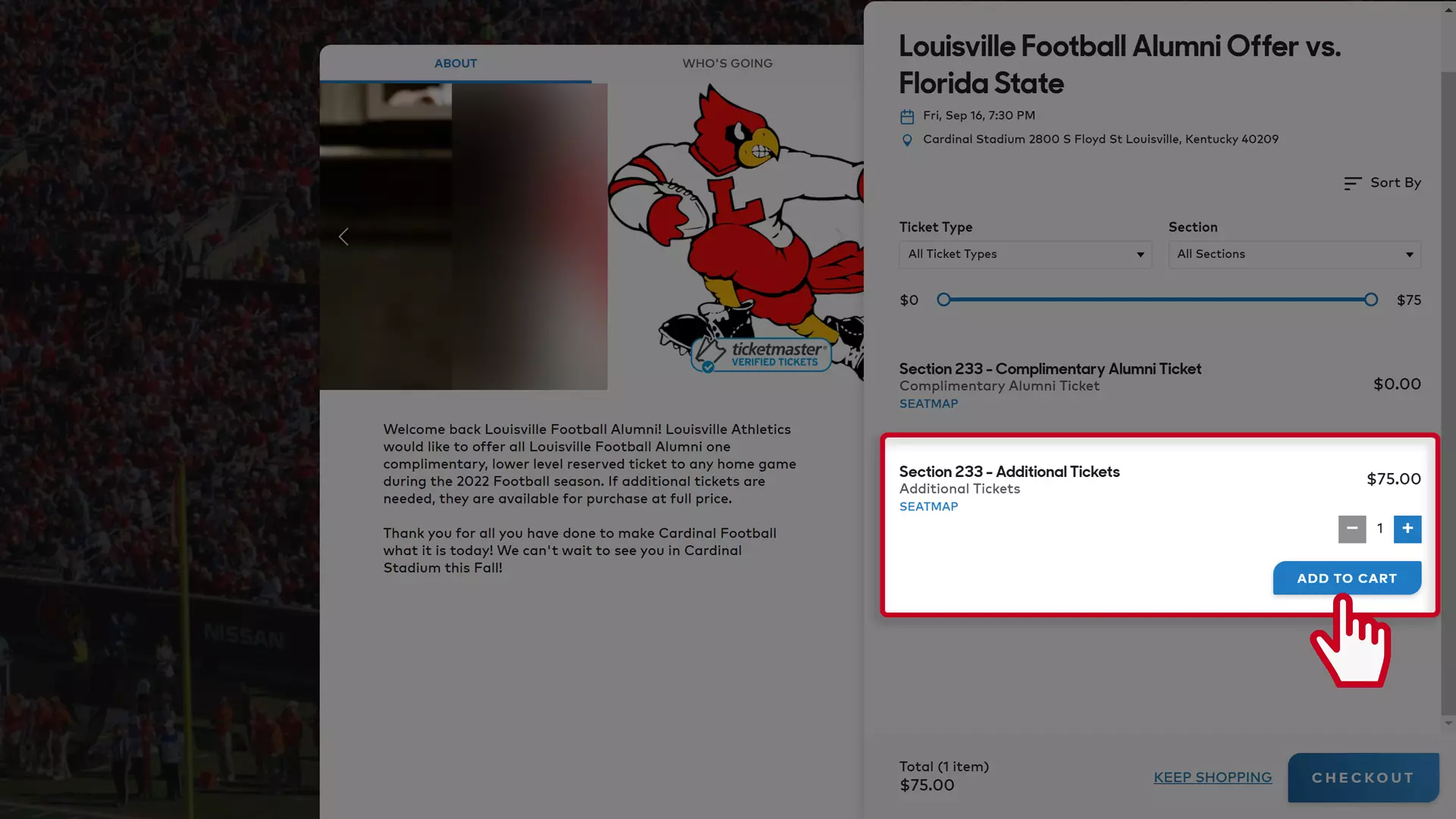
STEP 1
Enter your email address to access the ticket page - You must use the email address from which you received the communication from the Louisville Athletics Ticket Office. Then tap “Confirm.”
STEP 2
Tap the game that you are claiming a ticket for and select “Add to Cart.” If you do not wish to purchase additional tickets for the game, or claim tickets for other games, you're all set. Click “Checkout” to finalize the claim process.
IF PURCHASING ADDITIONAL TICKETS FOR A GAME
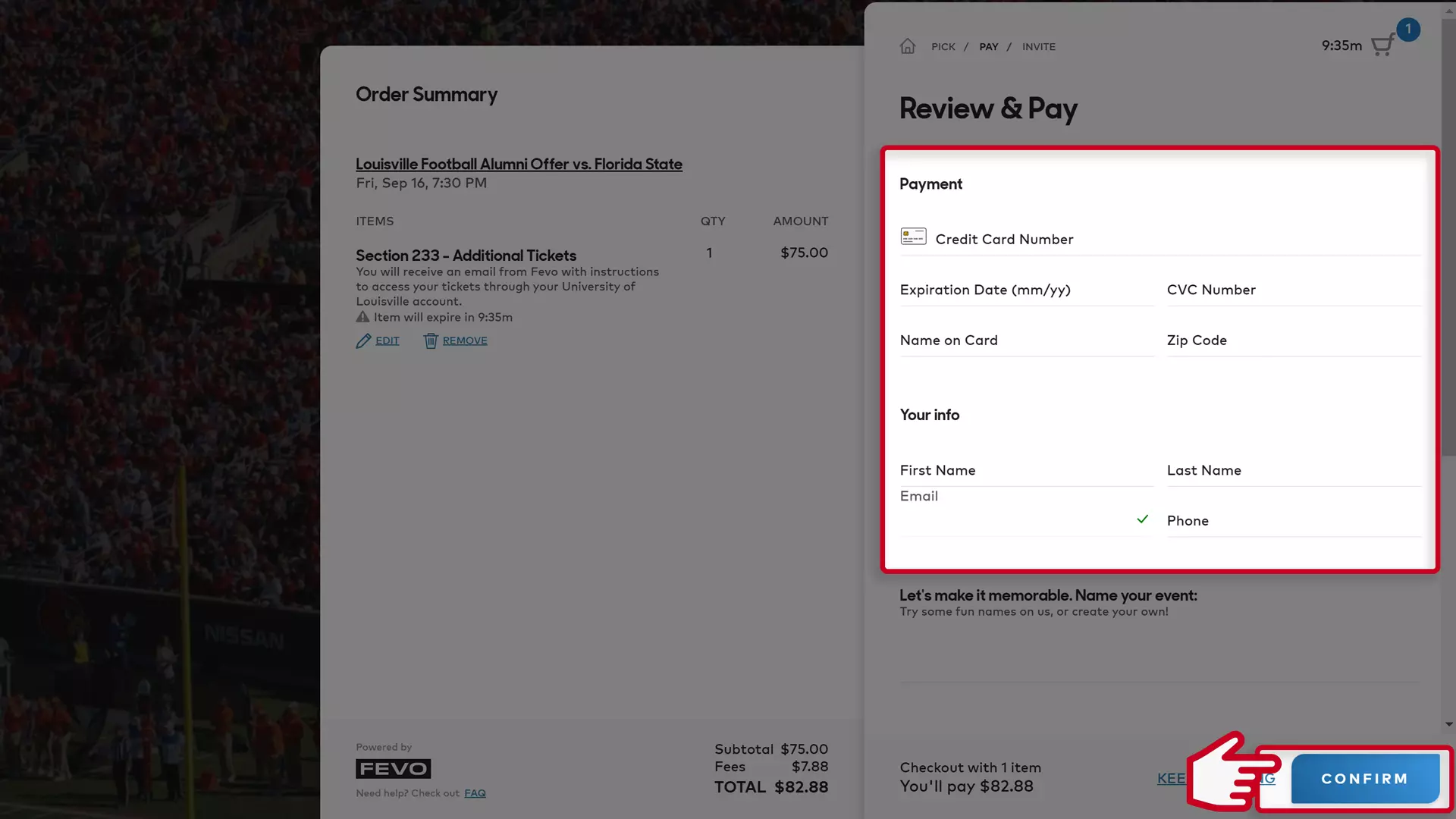
After adding the complimentary ticket to the game, tap the “Additional” Tickets" option underneath the complimentary ticket. If you would like to purchase more than one ticket, hit the “+” icon to change the quantity. Then, click the “Add to Cart” button. Next, tap “Checkout” and you will be directed to the page where you will complete your purchase.
You can review your selection under the “Order Summary on the left side of the page. Enter your credit card and contact information and then tap "Confirm."
IF CLAIMING TICKETS FOR MULTIPLE GAMES
You may claim tickets for more than one game at a time. To do so, after you claim a ticket for one game (see steps above), click the “Keep Shopping” link in the bottom right corner of the page and you will be redirected back to the list of games. From there, select the next game and hit “Add to Cart.” After you have selected a ticket for every game you would like to attend, tap “Checkout” to complete the claim process.

FREQUENTLY ASKED QUESTIONS
HOW DO I CLAIM A COMPLIMENTARY TICKET?
Every alumnus from a ticketed sport (football, men's and women's basketball, volleyball, and baseball) qualifies for the opportunity to request a complimentary single-game ticket to each home game for the sport in which they participated.
Monthly, the Ticket Office will send an email to each alumni group with a link to request tickets for home games during the upcoming month (for teams in season). Access will be restricted to the email address that we have on file. Alumni that need to update their contact info can complete the form below, or contact Brad Barber - email: brad@gocards.com, phone: 502-852-0126.
Tickets must be requested at least 48 hours prior to the game. All tickets will be mobile and can be accessed through the CardsMobile App or My Cardinals Account (gocards.com/account).
CAN I PURCHASE ADDITIONAL TICKETS?
Yes, the link that is shared monthly will also include the option to purchase additional tickets.
HOW DO I USE MOBILE TICKETS?
You can manage your tickets through My Cardinals Account, or by downloading the official CardsMobile App to your mobile device. The app is available for free on both Apple and Android devices.
- iPhone users - Download on the Apple Store
- Android users - Download on Google Play
UPDATE YOUR CONTACT INFO
UofL Athletics Alumni Update Form
The University of Louisville Athletic Department is in the process of updating its records and we need your help! Please take a moment to update your information below.
If you have any questions, please contact the Louisville Athletics Ticket Office - tickets@gocards.com or 502-852-5151.
Thanks and Go Cards!


